
Basic Instructions on How to Create a Program
Park and Rec must be turned on for your organization before you can add cities to a program. If you don't see the "Residence Cities" tab, contact your GotSport Rep or GotSport Support.
Instructions:
Step 1:
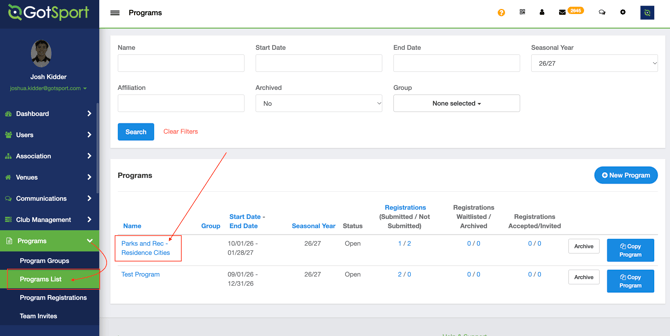
- Go to the "Programs" menu and click "Programs List"
- Click the program you want to edit.
- To create a new one, click "New Program".
Step 2:
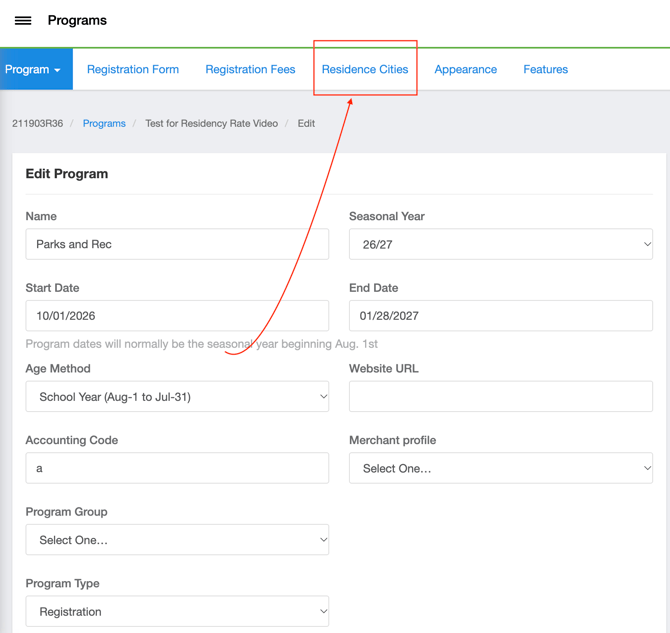
- Click the "Residence Cities" tab at the top of the page, between "Registration Fees" and "Appearance"
Step 4:
- Add a city in one of two ways:
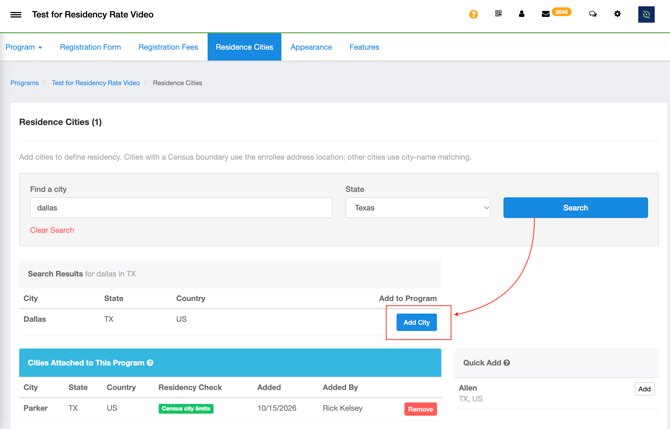
- Find a city: Type a city name or ZIP code (for example, Dallas or 75201), choose the "State", and click "Search". Then add the city from the results.
- Quick Add: Click "Add" next to a suggested city on the right.
Step 5:
- The city now appears under "Cities Attached to This Program", with its state, country, "Residency Check" type, the date it was added, and who added it.
Note: The "Residency Check" label shows how each city is matched. "Census city limits" means the enrollee's address is checked against the official city boundary. Cities without a Census boundary are matched by the city name on the enrollee's address.
Step 6: Setting up resident and non-resident options:
-
Create or Update Payment Plans
-
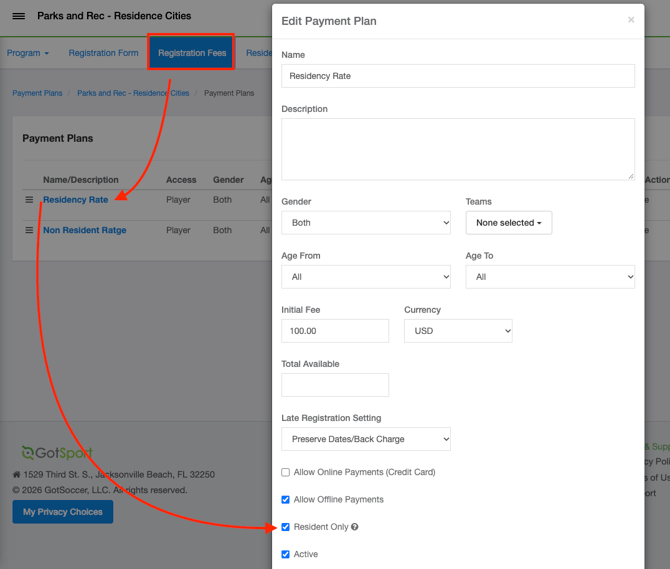
A fee pertaining to only residents is distinguished by toggling the "Resident Only" option within a specific Payment Plan
-
To offer different options for people inside and outside city limits, create a separate program (or registration fee) for each group and attach the city to the resident one.
Checking this box shows this payment plan only to registrants whose address matches one of the resident cities defined for this program.
FAQs
- How is Residency checked?
- Census city limits – cities are imported from the U.S. Census and matched by the location of the enrollee’s address against the official city boundary.
- City-name matching – cities without a Census boundary are matched by the city name on the enrollee’s address.
-
I don't see the "Residence Cities" tab on my program.
-
Park and Rec isn't turned on for your organization. Contact GotSport Support to turn it on.
-
-
I can't find my city when I search.
-
The city's boundary hasn't been added yet. Contact GotSport Support to have it added.
-
- Can one program use more than one city?
- Yes. Attach every city whose residents should count as residents.
- Can several programs use the same city?
- Yes. Each program can have the same city attached.