
New Update: October 2026
Instructions:
Step 1:
- From your Admin Dashboard, go to Settings > Flags
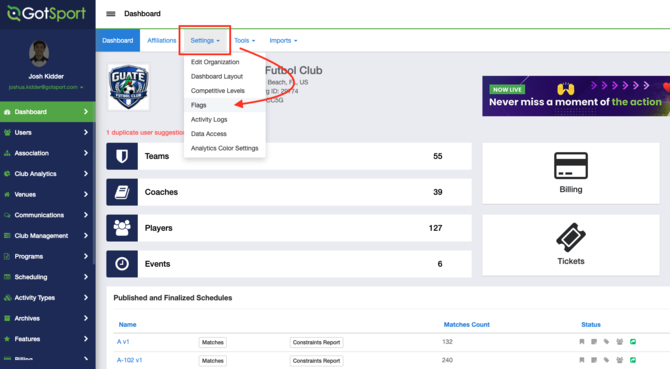
Step 2:
- Within the Flags page, you can now create Flags for specific areas
Step 3:
- These flags can now be added within their specific sections/areas.
Flags cannot be applied from this page, only created and managed; these newly created flags can then be applied within each specific section.
Section/Area Breakdown:
User Flags: A flag created here can be added to a user profile (player, coach, manager, etc.)
User Qualification Flags: A flag created here can be added to a specific user's risk management report - applicable to a governing organization that manages requirements like background checks
Member Registration Flags: A flag created here can be added to a submitted member registration - applicable to a governing organization or league association in which clubs register players with
Program Registration Flags: A flag created here can be added to a specific program registration - applicable to clubs that make use of the Programs tab in GotSport.
Contract Registration Flags: A flag created here can be added to any Form that is submitted (ex., age verification submission, liability waivers, etc)
Team Registration Flags: A flag created here can be added to a team's event registration - applicable to organizations that are hosting a league or tournament
Organization Flags: A flag created here can be added to a club or organization as a whole - applicable to a governing organization, or league association
Billing Account Flags: A flag created here can be added to any billing account (ex. billing account for a program registration, event registration, or form with payments involved)
Payment Flags: A flag created here can be added to a specific payment that was made within a billing account (ex. Oct. 1 payment for a program registration)