---
title: Program Set Up 🎥
description: This is a general overview of the first step to creating a new program, and the initial settings that you will first see.
---
[Skip to content](https://support.gotsport.com/program-set-up#main-content)
English - United States
Show submenu for translations

Open main navigation
Close main navigation
- English - United States
Show submenu for translations
- Contact us
Contact us
How can we help you?
- There are no suggestions because the search field is empty.
1. [GotSport](https://support.gotsport.com/?hsLang=en-us)
2. [Club Administrators](https://support.gotsport.com/club-administrators?hsLang=en-us)
3. [Programs](https://support.gotsport.com/club-administrators?hsLang=en-us#programs)
# Program Set Up 🎥
## This is a general overview of the first step to creating a new program, and the initial settings that you will first see.
**Instructions**
[Click Here to Watch a Video](https://www.loom.com/share/ab818646ab1c4948a939268874832f9b)[Tut](https://www.loom.com/share/ab818646ab1c4948a939268874832f9b)[orial](https://www.loom.com/share/ab818646ab1c4948a939268874832f9b)[of the Steps Below](https://www.loom.com/share/ab818646ab1c4948a939268874832f9b)
**Step 1:**
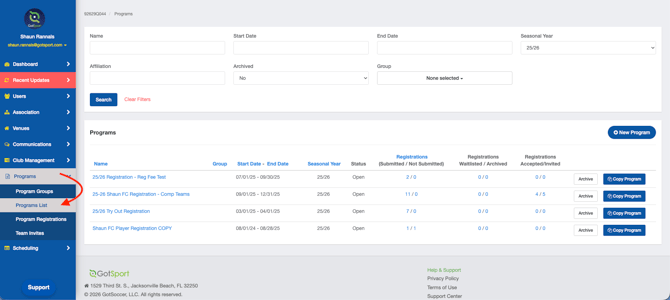
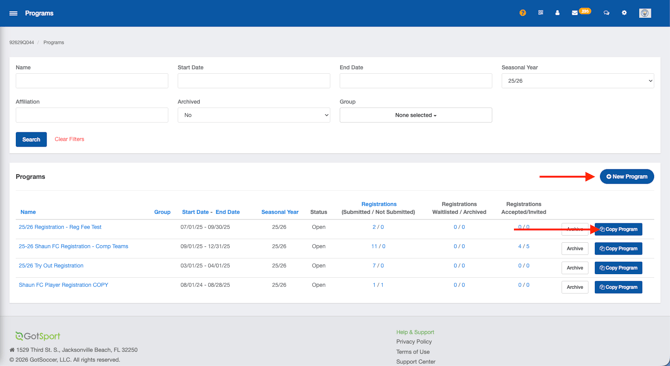
- From the **Dashboard**, click the **Programs** dropdown and select **Programs List**.
- Click **New Program,** or you can copy and edit a previously created program as well
****
**Step 2:**
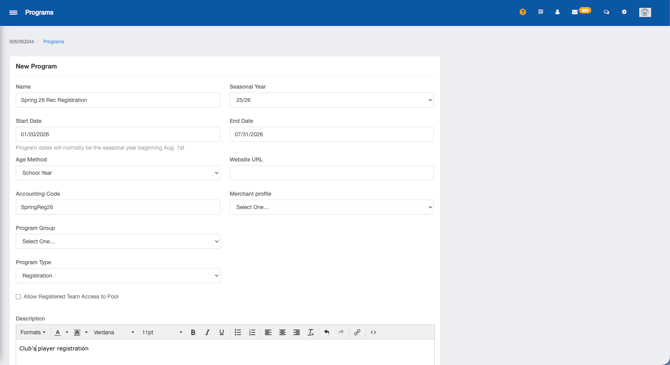
- The top of the page will ask for basic information about your program: **Program Name**, **Seasonal Year**, **Program Dates**, **Age Method**, **Website URL**, **Accounting Code**, **Merchant Profile, and Program Type.**
****
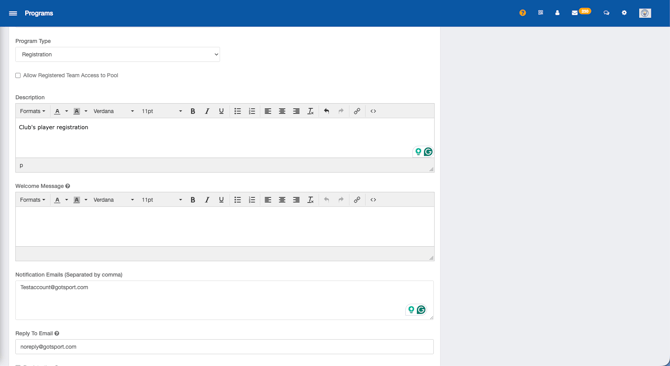
- **Description**: Text-box that allows you to input a general description of your program
- **Welcome Message**: This is a dialog box that will pop up to users on the program registration screen before they begin the registration process
- **Notification Emails**: Any email address placed here will receive an email notification when a player registers for the program.
- **Reply to Email**: This is the "reply to" email for registrants, leave it blank if you do
not want an email address registrants can reply to.
**
*Below are more definitions of the settings you can enable/disable*
- **Registration Open:** This will need to be enabled once you are ready to start accepting registrations. Leave un-checked to keep this registration 'closed'
- **Require Handwritten Signature:** This will require a handwritten signature acknowledging the user has understood the registration and cannot proceed to the payment without signing.
- **Allow Multiple Roles for One Registration:** Enabling this setting will allow the user to complete the registration for multiple roles. For example, Player registration and Coaching registration.
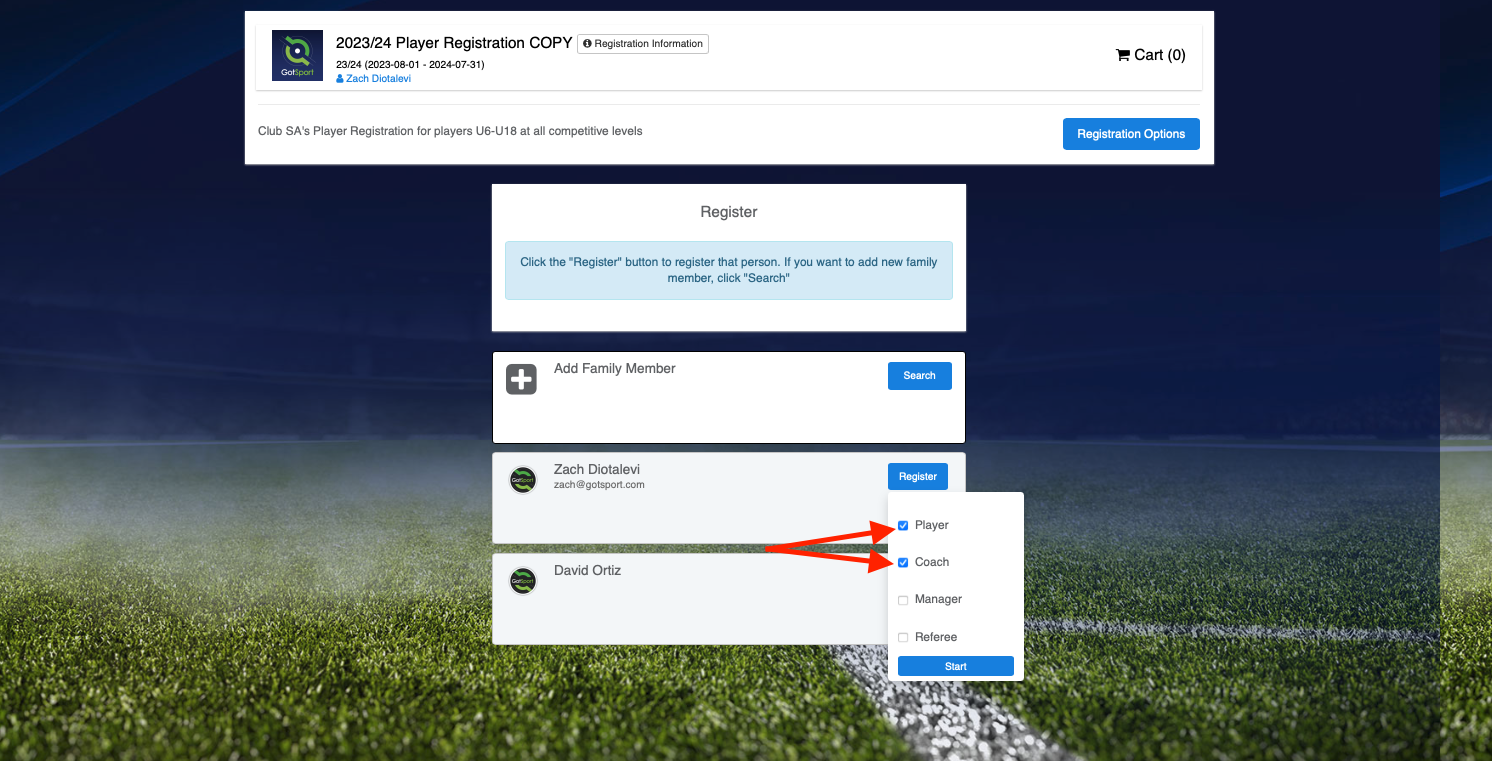
- **Ask For Parent Information:** Enable this setting to require parent information to be entered into the system. You're able to control the minimum and maximum before proceeding.
- **Allow Player to Select Age Group:** If you would like to allow players to age themselves up or down. This setting works directly with the "**Allow Player to Select Team"** setting below.
- **Show Emergency Info: This shows** a screen where the registrant can input any Emergency Contact information
- **Require Emergency Info:** Requires information to be input before progressing to the next screen
- **Show Insurance info:** Shows insurance information that can be input
- **Require Insurance Info:** Requires the insurance information to be input before progressing to the next screen.
- **Allow User to Select Organization:** This setting is primarily used for State Associations, Governing Associations, and the like. You can likely leave this setting unchecked.
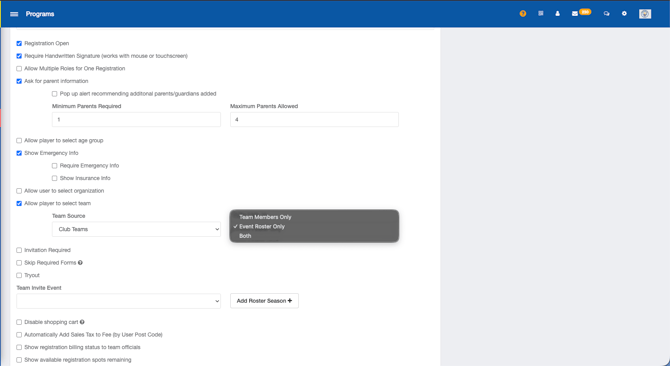
- **Allow Player to Select Team:** A player can choose the team they want to be added to. The team source can be from the club, or an event roster. Additionally, you have the option to add the player to the team member list, the team roster (for an individual event), or both.
*For example, this is useful when you're wrapping up the current season and have opened registration for the following year, a U5 player can select their age as U6 and the team source shown will show U6 Teams.*
**
- **Invitation Required:** Enabling this setting requires the user to complete the prerequisite registration before they can register for this program that you're building. For further information, please see this guide for [Requiring a Prerequisite](https://45990513.hs-sites.com/require-a-program-prerequisite/require-invitation?hsLang=en-us)
- **Skip Required Forms:** Enabling this setting allows users to skip forms that are presented during the setup. This setting works directly with the **Affiliation** and **Competitive** **Level** settings below. If you have USYS - Competitive set for the Affiliation/Competitive Level, the required forms will show. However, If you enable this setting, the registrant will not be required to complete the forms before progressing.
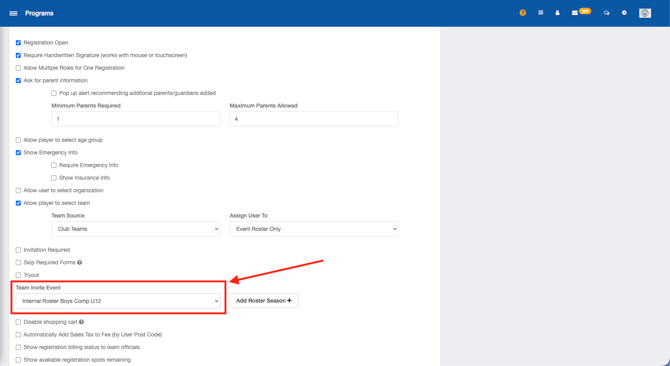
- **Team Invite Event:(Best used if you have a tryout registration)** If you are sending team invites, select your club's internal rostering event you would have created while setting up your tryout registration (ex. Internal Roster 23/24). Once players register from the invites you send, they will be automatically rostered to the team within the internal rostering event upon completion of the registration.
- **Tryout:** Tryout allows for a user to complete the registration, but is not placed into the club after submitting. Typically after a "tryout" registration, there is another official registration to complete, if deserving. This setting works with the "**Invitation Required"** setting shown above.
- **Disable Shopping Cart:** This setting will toggle the ability to have more than one registration in one "cart." This box will need to stay unchecked if you plan to offer Sibling Discounts or the like.
*NOTE\*\*\* This must be selected if this program is a Tryout*
- **Automatically Add Sales Tax to Fee (by User Post Code):** Another setting that is geared towards a State Association/Governing Body.
- **Show registration billing status to team officials:** A Manager/Coach will be able to see if a user is Paid, Current, or Due in regard to the billing plan they've selected for this program.
- **Show available registration spots remaining:** Enabling this setting will show a button that reads "Registration Options" on the homepage of the program. Clicking on the button will show how many payment plans are used/available.
- **Archived:** Select this box and click Save to archive the program.
- **Affiliation:** The registrant will have the selected Affiliate name attached to their User account automatically when they complete a Program Registration through your Organization.
- **Competitive Level:** The registrant will have the selected Competitive Level attached to their user account automatically when they complete a Program Registration through your Organization.
- **Available Roles:** This setting controls who can register for this program. If only a Player is selected, a Coach will not be able to start the registration. This setting works with the "**Allow Multiple Roles for One Registration"** setting listed above.
- **Photo Required For:** Enable this setting if you want a player photo uploaded during registration at a certain age.
- **College Profile Referral:** A third-party College profile (Default will publish/ None will not show this to the user).
- **Redirect After Checkout:** After submitting payment, choose if you want the user to be sent to a Summary or their User Dashboard.
- **Incomplete Registration Reminder:** If a player has started, but not submitted their registration, you can choose to send an automated email after **24**, **48**, or **72** **hours** of being incomplete.

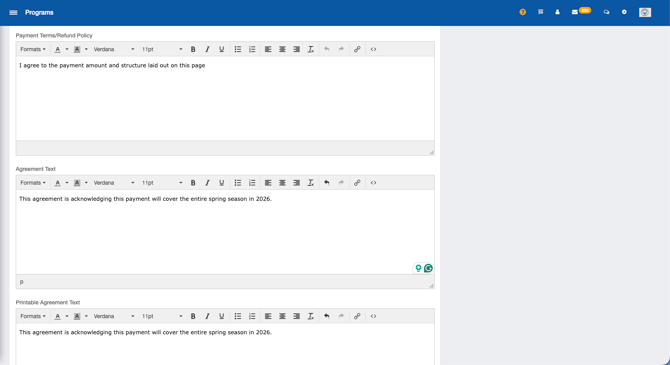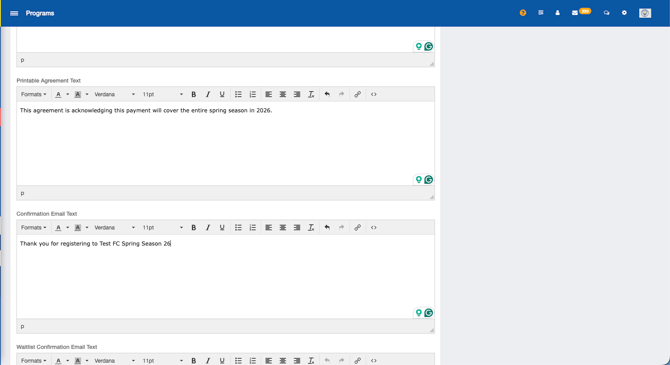
- **Payment Terms/Refund Policy**: Standard payment terms will be present by default, however, you may overwrite the standard text and enter your club's own payment terms if needed.
- **Agreement Text**: This area allows you to enter text the registrant will acknowledge when completing the registration.
- **Printable Agreement Text**: This area allows you to enter text the registrant can download and print after the registration.
- **Confirmation Email Text**: In this area, you can enter a custom confirmation email the registrant will receive after registration is complete.
- **Waitlist Confirmation Email Text:** This is the text that will be sent to the registrant when the available spots are filled and the user is placed on a waitlist.
- **Invite Text:** This is the text that will be sent when you invite a user to complete the registration.
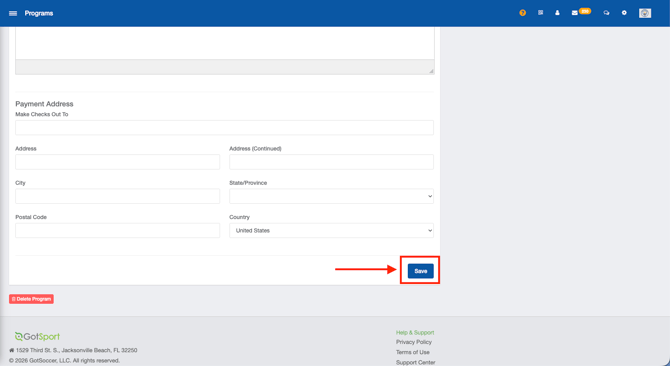
After you have selected and entered all the information on this program setup page, click **Save** at the bottom to continue.
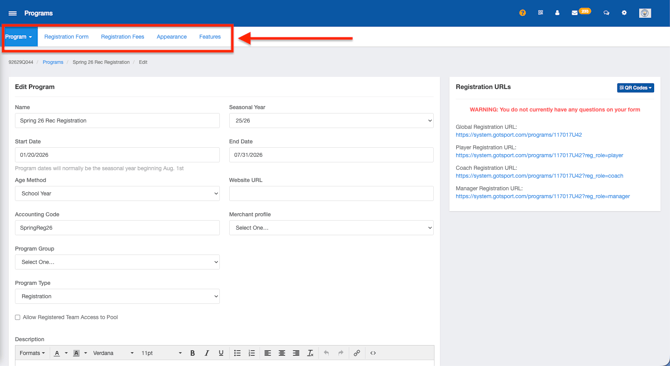
- After clicking **Save**, five new tabs will appear at the top of your page including **Programs** (when clicked on you will see Program List and Program Registrations), **Registration Form**, **Registration Fees**, **Appearance**, and **Features**.
If you are looking for further guidance on building a program, please reference the [8 Steps to Build a Program](https://support.gotsport.com/8-steps-to-create-a-program-registration?hsLang=en-us) to find your next module.
- [Recent Updates/Additions](https://support.gotsport.com/recent-updates-additions?hsLang=en-us#main-content)
- [Recent Updates](https://support.gotsport.com/recent-updates-additions?hsLang=en-us#recent-updates)
- [New Functionality](https://support.gotsport.com/recent-updates-additions?hsLang=en-us#new-functionality)
- [Club Administrators](https://support.gotsport.com/club-administrators?hsLang=en-us#main-content)
- [Dashboard & Users](https://support.gotsport.com/club-administrators?hsLang=en-us#dashboard-users)
- [Preparing For Upcoming Season](https://support.gotsport.com/club-administrators?hsLang=en-us#preparing-for-upcoming-season)
- [Risk Management and Governing Body Forms](https://support.gotsport.com/club-administrators?hsLang=en-us#risk-management-and-governing-body-forms)
- [Communications](https://support.gotsport.com/club-administrators?hsLang=en-us#communications)
- [Club Management](https://support.gotsport.com/club-administrators?hsLang=en-us#club-management)
- [Programs](https://support.gotsport.com/club-administrators?hsLang=en-us#programs)
- [Billing](https://support.gotsport.com/club-administrators?hsLang=en-us#billing)
- [Forms](https://support.gotsport.com/club-administrators?hsLang=en-us#forms)
- [Events and Rosters](https://support.gotsport.com/club-administrators?hsLang=en-us#events-and-rosters)
- [Features (Discounts and Add-Ons)](https://support.gotsport.com/club-administrators?hsLang=en-us#features-discounts-and-add-ons)
- [Managers/Coaches](https://support.gotsport.com/managers-coaches?hsLang=en-us#main-content)
- [Team and Player Management](https://support.gotsport.com/managers-coaches?hsLang=en-us#team-and-player-management)
- [GotTravel - Hotels](https://support.gotsport.com/managers-coaches?hsLang=en-us#gottravel-hotels)
- [Risk Management](https://support.gotsport.com/managers-coaches?hsLang=en-us#risk-management)
- [Event Management](https://support.gotsport.com/managers-coaches?hsLang=en-us#event-management)
- [Registering Teams to Leagues & Tournaments](https://support.gotsport.com/managers-coaches?hsLang=en-us#registering-teams-to-leagues-tournaments)
- [Parents/Players](https://support.gotsport.com/parents-players?hsLang=en-us#main-content)
- [Parent/Player Account Management](https://support.gotsport.com/parents-players?hsLang=en-us#parent-player-account-management)
- [Risk Management and Required Forms](https://support.gotsport.com/parents-players?hsLang=en-us#risk-management-and-required-forms)
- [GotTravel - Hotels](https://support.gotsport.com/parents-players?hsLang=en-us#gottravel-hotels)
- [Registering for a Program](https://support.gotsport.com/parents-players?hsLang=en-us#registering-for-a-program)
- [Billing](https://support.gotsport.com/parents-players?hsLang=en-us#billing)
- [Governing Bodies](https://support.gotsport.com/governing-bodies?hsLang=en-us#main-content)
- [General Instructions For Governing Bodies](https://support.gotsport.com/governing-bodies?hsLang=en-us#general-instructions-for-governing-bodies)
- [US Club Soccer](https://support.gotsport.com/governing-bodies?hsLang=en-us#us-club-soccer)
- [USSSA SOCCER](https://support.gotsport.com/governing-bodies?hsLang=en-us#usssa-soccer)
- [Girls Academy](https://support.gotsport.com/governing-bodies?hsLang=en-us#girls-academy)
- [U.S. Futsal](https://support.gotsport.com/governing-bodies?hsLang=en-us#u-s-futsal)
- [Governing Body Forms/Risk Management](https://support.gotsport.com/governing-bodies?hsLang=en-us#governing-body-forms-risk-management)
- [State Specific Processes](https://support.gotsport.com/governing-bodies?hsLang=en-us#state-specific-processes)
- [Managing Child Organizations](https://support.gotsport.com/governing-bodies?hsLang=en-us#managing-child-organizations)
- [Preparing for an Upcoming Season](https://support.gotsport.com/governing-bodies?hsLang=en-us#preparing-for-an-upcoming-season)
- [Billing](https://support.gotsport.com/governing-bodies?hsLang=en-us#billing)
- [Event Directors](https://support.gotsport.com/event-directors?hsLang=en-us#main-content)
- [Competition & Event Setup](https://support.gotsport.com/event-directors?hsLang=en-us#competition-event-setup)
- [Managing Event Registrations](https://support.gotsport.com/event-directors?hsLang=en-us#managing-event-registrations)
- [Billing](https://support.gotsport.com/event-directors?hsLang=en-us#billing)
- [Scheduling](https://support.gotsport.com/event-directors?hsLang=en-us#scheduling)
- [Rosters, Match Cards, and Game Day Procedures](https://support.gotsport.com/event-directors?hsLang=en-us#rosters-match-cards-and-game-day-procedures)
- [Officials Management](https://support.gotsport.com/event-directors?hsLang=en-us#officials-management)
- [Scoring](https://support.gotsport.com/event-directors?hsLang=en-us#scoring)
- [Suspensions](https://support.gotsport.com/event-directors?hsLang=en-us#suspensions)
- [Got Travel - Hotels](https://support.gotsport.com/event-directors?hsLang=en-us#got-travel-hotels)
- [College Coaches](https://support.gotsport.com/event-directors?hsLang=en-us#college-coaches)
- [Rankings](https://support.gotsport.com/rankings?hsLang=en-us#main-content)
- [FAQ](https://support.gotsport.com/rankings?hsLang=en-us#faq)
- [Rankings Overview](https://support.gotsport.com/rankings?hsLang=en-us#rankings-overview)
- [Team Merge / Team ID's](https://support.gotsport.com/rankings?hsLang=en-us#team-merge-team-ids)
- [GotSport Pay](https://support.gotsport.com/gotsport-pay?hsLang=en-us#main-content)
- [GotSport Pay](https://support.gotsport.com/gotsport-pay?hsLang=en-us#gotsport-pay)
- [Ticketing and Store](https://support.gotsport.com/ticketing-and-store?hsLang=en-us#main-content)
- [Ticket/Store Purchasers Help](https://support.gotsport.com/ticketing-and-store?hsLang=en-us#ticket-store-purchasers-help)
- [Ticketing/Store Admin - Store Setup](https://support.gotsport.com/ticketing-and-store?hsLang=en-us#ticketing-store-admin-store-setup)
- [Ticketing/Store Admin - Managing Tickets and Orders](https://support.gotsport.com/ticketing-and-store?hsLang=en-us#ticketing-store-admin-managing-tickets-and-orders)
- [Scanner App](https://support.gotsport.com/ticketing-and-store?hsLang=en-us#scanner-app)
- [GotSport Live](https://support.gotsport.com/gotsport-live?hsLang=en-us#main-content)
- [How to Get Started](https://support.gotsport.com/gotsport-live?hsLang=en-us#how-to-get-started)
- [Digital Gameday](https://support.gotsport.com/gotsport-live?hsLang=en-us#digital-gameday)
- [GotSport Live FAQ](https://support.gotsport.com/gotsport-live?hsLang=en-us#gotsport-live-faq)
- [GotSport Live - Manage the Team](https://support.gotsport.com/gotsport-live?hsLang=en-us#gotsport-live-manage-the-team)
- [GotSport Live Livestreaming](https://support.gotsport.com/gotsport-live?hsLang=en-us#gotsport-live-livestreaming)
- [GotSport Live Create Game Content](https://support.gotsport.com/gotsport-live?hsLang=en-us#gotsport-live-create-game-content)
- [GotSport Live Team Rosters and Lineups](https://support.gotsport.com/gotsport-live?hsLang=en-us#gotsport-live-team-rosters-and-lineups)
- [GotSport Connect](https://support.gotsport.com/gotsport-connect?hsLang=en-us#main-content)
- [Newsfeed](https://support.gotsport.com/gotsport-connect?hsLang=en-us#newsfeed)
- [Schedule](https://support.gotsport.com/gotsport-connect?hsLang=en-us#schedule)
- [Chat](https://support.gotsport.com/gotsport-connect?hsLang=en-us#chat)
- [GotSport Team App](https://support.gotsport.com/gotsport-team-app?hsLang=en-us#main-content)
- [Parent/Athlete Mobile App](https://support.gotsport.com/gotsport-team-app?hsLang=en-us#parent-athlete-mobile-app)
- [GotSport Team App - General Support](https://support.gotsport.com/gotsport-team-app?hsLang=en-us#gotsport-team-app-general-support)
- [Coach/Manager - Mobile App](https://support.gotsport.com/gotsport-team-app?hsLang=en-us#coach-manager-mobile-app)
- [Club Administrator](https://support.gotsport.com/gotsport-team-app?hsLang=en-us#club-administrator)
- [Parent/Athlete Desktop](https://support.gotsport.com/gotsport-team-app?hsLang=en-us#parent-athlete-desktop)
- [Commonly Asked Questions](https://support.gotsport.com/gotsport-team-app?hsLang=en-us#commonly-asked-questions)
- [Coach/Manager - Desktop](https://support.gotsport.com/gotsport-team-app?hsLang=en-us#coach-manager-desktop)
- [US Club Soccer Articles](https://support.gotsport.com/us-club-soccer-articles?hsLang=en-us#main-content)
- [Club Administrators - Preparing for the Upcoming Season](https://support.gotsport.com/us-club-soccer-articles?hsLang=en-us#club-administrators-preparing-for-the-upcoming-season)
- [Club Administrators - Events](https://support.gotsport.com/us-club-soccer-articles?hsLang=en-us#club-administrators-events)
- [US Club Soccer - Parents and Players](https://support.gotsport.com/us-club-soccer-articles?hsLang=en-us#us-club-soccer-parents-and-players)
- [Club Admin - General](https://support.gotsport.com/us-club-soccer-articles?hsLang=en-us#club-admin-general)
- [Referees and Assigning](https://support.gotsport.com/referees-and-assigning?hsLang=en-us#main-content)
- [Referees](https://support.gotsport.com/referees-and-assigning?hsLang=en-us#referees)
- [Assignors](https://support.gotsport.com/referees-and-assigning?hsLang=en-us#assignors)
- [College Coaches](https://support.gotsport.com/college-coaches?hsLang=en-us#main-content)
- [College Coach Articles](https://support.gotsport.com/college-coaches?hsLang=en-us#college-coach-articles)
- [Pro Schedules](https://support.gotsport.com/pro-schedules?hsLang=en-us#main-content)
- [Dashboard](https://support.gotsport.com/pro-schedules?hsLang=en-us#dashboard)
- [Club Information](https://support.gotsport.com/pro-schedules?hsLang=en-us#club-information)
- [Venues](https://support.gotsport.com/pro-schedules?hsLang=en-us#venues)
- [Constraints](https://support.gotsport.com/pro-schedules?hsLang=en-us#constraints)
- [Scheduling](https://support.gotsport.com/pro-schedules?hsLang=en-us#scheduling)
- [Reports and Exports](https://support.gotsport.com/pro-schedules?hsLang=en-us#reports-and-exports)
- [Pro Services](https://support.gotsport.com/pro-services?hsLang=en-us#main-content)
- [Team Services](https://support.gotsport.com/pro-services?hsLang=en-us#team-services)
- [Match Countdown](https://support.gotsport.com/pro-services?hsLang=en-us#match-countdown)
- [Rate Cards](https://support.gotsport.com/pro-services?hsLang=en-us#rate-cards)
- [USYS NL](https://support.gotsport.com/usys-nl?hsLang=en-us#main-content)
- [Coach/Manager Roles](https://support.gotsport.com/usys-nl?hsLang=en-us#coach-manager-roles)
- [Players](https://support.gotsport.com/usys-nl?hsLang=en-us#players)
- [CAF](https://support.gotsport.com/caf?hsLang=en-us)
- [Store](https://support.gotsport.com/store?hsLang=en-us)
- [Parks and Recreation](https://support.gotsport.com/parks-and-recreation?hsLang=en-us#main-content)
- [Programs](https://support.gotsport.com/parks-and-recreation?hsLang=en-us#programs)
[](https://home.gotsport.com)
[mailto:email@email.com](mailto:email@email.com)
Copyright © 2026, GotSport